
 Log In
LeadTruffle Insights
Google Local Services Ads for Contractors: Setup, Costs, and Credits
Set up Google Local Services Ads for your contracting business. Learn eligibility, Google Verified, lead costs, call routing, and current credit rules.
Quick Answer
tl;dr: Google Local Services Ads let eligible home service contractors receive inquiries for the services and areas they cover. Check eligibility, complete the verification steps shown in your account, set a budget, and make sure your team can handle calls and messages. As of October 2026, Google is migrating selected U.S. LSA accounts to pay-per-lead campaigns managed in Google Ads, with broader phases to follow through 2027. The pay-per-lead model and Google Search and Maps placements remain. For migrated accounts, campaign settings and leads move to Google Ads, and historical LSA performance reports do not transfer, so save them before your account switches. Check account notices for your timing. Google’s migration guidance
A lead is an opportunity to win work, not a guaranteed appointment, paying customer, or profitable job. Connect advertising to intake, follow-up, scheduling, and completed-job reporting.
Check eligibility for your trade and location
Start with Google’s Local Services Ads overview and eligibility flow. Availability depends on service category and geography; don’t assume a service is available everywhere just because another contractor advertises it. Google’s Local Services Ads overview
Google typically requires that an advertiser has an affiliated public, verified Google Business Profile account for direct advertisers (with exceptions for partner-affiliates). Business Profile affiliation guidance
Choose the category that matches your work. Cleaning, roofing, and HVAC businesses can have different requirements. Follow the checklist shown in your account.
What does the Google Verified badge mean?
Google Verified indicates that an advertiser completed the required screening and verification checks. Relevant checks are described on the profile. The badge should not be presented as a promise that Google will reimburse a dissatisfied customer.
Google's current badge instructions state that the money-back guarantee is no longer available, and provide individual details and eligibility for older bookings. If you're talking about a historical claim, read those terms. Google Verified guidance
Set up Google Local Services Ads
- Start with Google's sign-up process if your account has not migrated; after migration, manage the campaign in Google Ads.
- Fill in business information and link to the relevant Business Profile.
- Determine what services, service areas and hours you can provide.
- Fill in the information Google asks you for verification purposes.
- Establish billing, budget and options for bidding.
- Set up lead notifications and who receives them (calls, messages and bookings).
- Test the customer journey and review the quality of early leads before increasing spend.
Make sure the advertising owner, office staff, and onboarding contact are aligned. Launching a campaign before the phone process is ready can lead to missed inquiries.
Prepare documents without assuming universal requirements
Some selected U.S. advertisers may receive accelerated verification and then have 14 days to complete additional steps.
Complete the coverage and document requirements shown in your dashboard. Requirements vary; don’t assume every contractor needs the same insurance coverage or that every employee is subject to the same checks. Google verification process
Work through onboarding in a practical order
Follow the setup checklist above and assign each task to someone responsible for completing it.
Make sure the person handling ads has access to the business account, and that the person responsible for licenses or insurance provides accurate documents. Don’t use an employee’s personal account without clear business ownership.
Verify the business name, address, call destination, and profile. If your legal name differs from your advertised name, provide the documents Google requests; don’t alter documents to make them match.
Use the verification dashboard as the source of truth. Track outstanding items, due dates, and corrections. If a step fails, follow the help route shown in your account instead of opening new accounts repeatedly.
Prior to going live, verify access to billing, the person/business who will receive the notifications, the actual call destination, and the individual responsible for each inquiry. Have an alternate owner to keep around for days when the first one is not in the office.
Choose service areas and job types deliberately
Choose work within a profitable travel radius. Use service areas that reflect the locations your team can actually cover; don’t select the broadest possible area by default.
Google’s service-area and job-type guidance explains how these settings affect eligible searches. The interface for editing service areas may depend on whether your account has migrated. Search location can also affect which ad is eligible to show. service-area and job-type guidance
Work may have been arranged by someone outside your area at a house within your area. Before dismissing the project, verify the address before you think it is of no interest to you.
If a certain job category is still generating the wrong inquiries, check the inquiry against the enabled services. Change the setting which created the mismatch, rather than adding a general warning to your profile.
Prepare your profile for the homeowner's decision
Write a business description that accurately covers your services, area, and experience. Use relevant photos of your team, vehicles, and completed work, and get permission before publishing them.
Keep your listed hours consistent with your actual availability and response process. If you accept after-hours inquiries, have a way to confirm and plan for each request, even when service is scheduled for the next day.
Avoid calling all requests "emergency work" or making an unconfirmed promise of a specific time of arrival. Instead of trying to maximize the number of contacts, the profile should attract customers you can serve.
How much do LSA leads cost?
Google says lead prices depend on location, job type, lead type, and bidding method. Set a budget you can evaluate using your own results, not another trade’s cost per lead.
For accounts still using the LSA dashboard, the average weekly budget is not a hard cap for each week; Google can spend more in a week but not above the monthly maximum. After migration, Google converts the weekly budget to an average daily budget, with a monthly cap. Check the budget guidance for the interface your account uses. Google’s migration guidance
Use your account’s actual lead charges to establish a baseline. Compare the same date range, service areas, and job types, then track how many inquiries become booked appointments and completed paid jobs. A lower cost per lead is only useful if those leads fit your business.
Choose a bidding approach you can evaluate
Google's bidding advice lists three modes for accounts still using the LSA interface. On migrated campaigns, manual “Max per lead” bidding is no longer supported. Check the options available in your account. Google’s migration guidance
| Bid mode | How it works | Decision to make |
|---|---|---|
| Maximize leads | Google sets bids to seek more leads within the budget | Can your team handle the resulting inquiries? |
| Target cost per lead | Automated bidding with an optional average CPL target | Is the target grounded in realistic costs and margins? |
| Max per lead | You set a maximum bid | Is the limit restricting relevant opportunities? |
Use Google’s budget guidance when setting a budget, and allow automated bidding time to adjust. Treat platform recommendations as planning guidance, not a promise of lead volume or a reason to overspend.
Select the options you have in your account. While making changes to one major variable at a time, record the date and compare the results, as you can't tell if the change was due to one of the edits or due to the other variables.
Translate a lead budget into an operational plan
For example, if your team can take on 8 more paid jobs each month and 25% of leads become paid jobs, you’d need about 32 leads. At an assumed $60 cost per lead, that’s $1,920 in ad spend. Replace these assumptions with your own data and leave room for uncertainty.
That plan only works if your team has room for eight more jobs and each job remains profitable after delivery costs. Track installations, emergency repairs, and recurring services separately.
Don’t judge a budget by whether it was spent. Review inquiries, appointments, completed work, and acquisition cost.
For account-level reporting, LSA Convert by LeadTruffle brings LSA lead activity, charges, spend, and feedback status into one dashboard. Use it to review what Google billed, then compare those records with your appointment and completed-job outcomes. Lead feedback is submitted only after your review and does not guarantee a credit.
If your team is fully booked, review the job types and hours you advertise. Don’t spend on inquiries you can’t serve.
Work backward from completed jobs
Illustrative example: $1,500 in ad spend generates 30 leads, 12 booked appointments, and 6 completed paid jobs. These are planning figures, not industry averages or LeadTruffle customer results.
Your cost per lead is $50, cost per booked appointment is $125, and cost per paid job is $250.
If the jobs generate $6,000 in revenue, then the ROAS is 4x revenue/ ad spend. But it doesn't mean 4x profit. Labor, materials, overhead, sales work and other acquisition costs still apply.
Review the funnel monthly. Did the change increase lead volume, the share of leads becoming appointments, or the number of completed paid jobs?
What affects LSA visibility?
Google describes its auction as considering search context, profile quality, and the bid. Factors can include responsiveness, reviews, photos, and relevant business information.
Google’s public guidance points to relevance and profile quality, but it does not publish a universal combination of review count, star rating, or response time that guarantees a top position. Google ranking guidance
You can facilitate your business to be contacted more easily by enabling the supported contact methods. Don't advertise hours and services that you cannot support.
Manage reviews as an ongoing service process
For direct Google advertisers, Google Business Profile will handle reviews instead of a separate LSA review inbox. Google's LSA review guidance outlines the location of the review link and how the reviews relate to the profile.
Ask customers for honest feedback on completed work through your business review link. Use a consistent process, respond constructively, and don’t offer incentives, filter out negative feedback, or pressure customers for a particular rating.
Take note of complaints about: Unmet arrival expectations, unclear diagnostic fees or a missed estimate. Better service is more beneficial than aiming for a random number of reviews.
Handle multiple locations without duplicating confusion
For each location, confirm the account owner, response team, services offered, and where leads are recorded. Where available, use location-specific routing and reporting.
Avoid making additional profiles and accounts just to fill additional search spots. According to Google's ranking guidance, if there are a number of locations for one business in the same area, then the ad with the best rank will be displayed for a query.
For a central office, put the service location on the lead before dispatch. Monitor acquisition/paid-job outcomes by location to prevent the best branch from masking poor performance on other branches.
How LSA calls and messages reach your team
For phone leads, Google displays a dynamic forwarding number that routes callers to your business number. You can’t choose that tracking number. Additional forwarding or VoIP may affect whether callers hear the “Call from Google” announcement. Google’s call-handling explanation
If you use a receptionist or AI answering service, map the full call path: Google’s number, your business number, the receiving team, and the fallback. Test answered, unanswered, and after-hours calls, and check for forwarding loops.
Message leads follow a different path from calls. A notification, CRM record, and reply to the customer are separate events. Check the conversation in Google’s lead inbox.
A homeowner may contact more than one advertiser. Google says message-lead pricing can consider whether the customer has contacted other advertisers.
How automated LSA credits work
Google first assesses leads and may reassess charged leads later. Your account can show statuses such as Not charged, Charged, In review, or Credited. In most cases, credits are applied within 30 days.
If unsuitable inquiries keep arriving, use Google’s lead feedback survey and review your targeting. Google no longer offers credits for “job type not serviced” or “geo not serviced.” Feedback does not guarantee a credit. Automated lead-credit guidance
Don't assume that a short call is a free call. Missed call situations, voicemails, messages, answered calls, bookings, and some missed calls are covered by Google's valid-lead guidance. The length of the call is not sufficient billing criteria.
Understand the 20-second missed-call rule
As per Google's current valid-lead rules, an unanswered call will be chargeable if the customer is still on the line for over 20 seconds during the defined business hour and active ad schedule.
If an IVR asks the caller to press a key and they hang up without pressing one, the missed-call timer doesn’t start. After the first key press, the 20-second timer starts; later key presses don’t reset it. A voicemail or greeting during operating hours can be chargeable if the caller stays on the line for more than 20 seconds, whether or not they leave a message.
This rule is about missed calls. An answered call is evaluated on the phone call itself, not automatically based on the fact that a call was rung for more than 20 seconds.
Don’t create an unfriendly menu to avoid charges. Route callers to the right person and check call and charge status if something seems wrong.
Review credits without confusing them with sales outcomes
Review a short billing summary each month.
- Correlate charge with the real lead and date.
- Review the conversation and record why the lead may not fit.
- Use the lead feedback form when it’s available, and give specific, factual details.
- Track requested credits against your account balance.
- Address recurring targeting or intake issues in addition to the billing review.
If a homeowner shops around for quotes and/or selects someone other than the first company that gave them a quote, that does not make the lead invalid. Don't combine “lost job” and “billing concern” into one status as that will result in inflated reports of lead quality issues.
Connect lead response with your CRM
Assign an owner and next step to each inquiry. Record its source, service requested, location, first response, appointment, and completed-job outcome. Avoid duplicate follow-up messages.
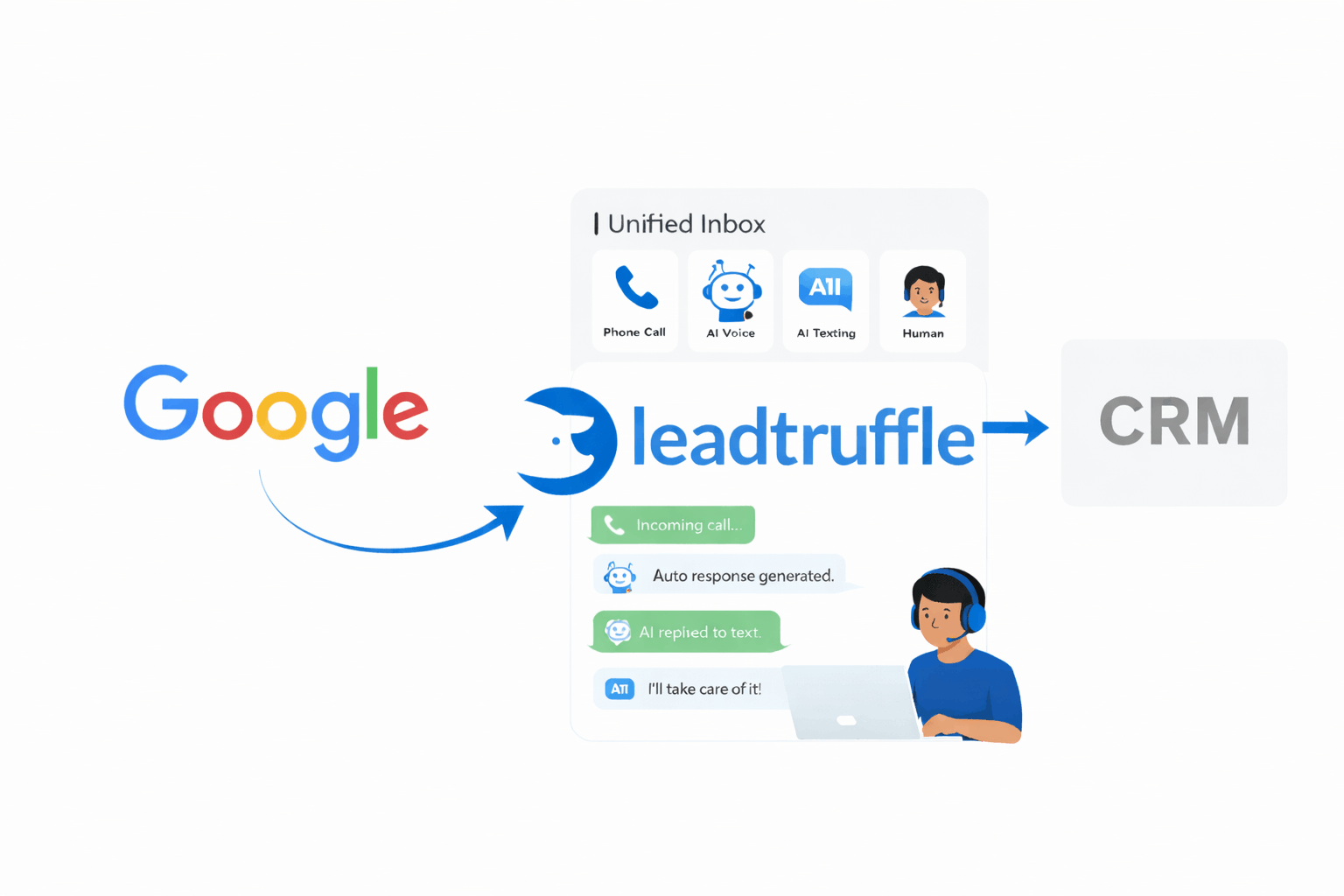
LeadTruffle’s Google LSA autoresponder supports direct sync and may also use email relay, depending on account setup. Phone forwarding is configured separately, and available actions depend on the connected account and permissions. For related workflows, see AI lead qualification and missed-call text-back. Those tools are separate from Google LSA lead import and phone forwarding.
Call Connect currently supports eligible inquiries that arrive through email forwarding with a callable number. It doesn’t support API-imported leads or inbound LSA calls.
Make sure someone can take over from automation, that the source and status reach your CRM, and that the customer gets the expected reply. Booking requires the right integration permissions and available appointment slots.
Observe how your LSA inquiries are taken to your team and advance towards booking.
Review performance before increasing budget
Analyze lead relevance, contact rate, booked appointments, completed jobs, revenue, and acquisition cost. Have different phone and message paths if they are treated differently.
If calls are not answered then fix coverage. If contacts are too far away check settings. If appointments are not to be paid work, review qualification, availability, estimates and follow up.
Keep other acquisition sources up as well. LSA can complement other search advertising strategies, including organic search and referrals, as well as service-specific search ads. Our HVAC lead generation guide demonstrates how to compare them.
Run a daily, weekly, and monthly LSA routine
Daily: make sure every inquiry has an owner
Review new leads and unopened notifications. Make sure that appointments are confirmed, return calls and find out if any calls were missed. Change each record to include a next action, instead of an unworked notification.
Weekly: inspect quality and customer handling
Check charge statuses, review a sample of calls and messages available and reconcile CRM records. Check for missing source tags, duplicate conversations, incorrect service selections & promises not delivered to the team.
Choose one improvement, record it, and assign responsibility. Improving a campaign is simpler when you have a team that can take an issue from inquiry to outcome.
Monthly: decide whether to maintain, change, or scale
Track the number of leads, contacts, appointments, and paid jobs, along with average acquisition cost and contribution after delivery costs. Use consistent definitions and account for longer sales cycles.
When changing budgets, consider current capacity and seasonal demand. Change one major setting at a time and record what changed so you can interpret the result.
Troubleshoot low visibility, poor leads, and missed bookings
| Problem | First checks | Next action |
|---|---|---|
| Ad not showing | Approval, account status, schedule, billing, budget | Resolve the specific alert before changing bids |
| Low lead volume | Actual demand, relevant coverage, service selections, bid constraints | Test one justified change and monitor |
| Wrong-area inquiries | Project address versus caller location, saved coverage | Correct targeting and verify the next requests |
| Wrong-service inquiries | Enabled job types and wording | Remove work you do not deliver |
| Many missed calls | Routing, ring behavior, office coverage, fallback | Test the full path and assign backup handling |
| Leads but few appointments | Qualification, response delivery, available dates | Review conversations and clarify the next step |
| Appointments but few paid jobs | Estimates, attendance, job fit, sales follow-up | Improve that stage before buying more volume |
Google notes that an ad may not appear on every search. Use its ads-not-running checklist and account reports; repeatedly searching your business name is not a reliable way to judge ad delivery.
If you want to have something verified, complete the required action or escalate via the account's support path. If the routing issue is encountered, test it directly and then the entire customer route. These require different repairs.
A first-month launch checklist
Before launch
Verify eligibility and requested verification, accurate service coverage, who bills for the service, useful profile information and a tested lead-handling process. Have one person sign off on the launch.
First week
Check notifications and routing each day. Check all the early enquiries regarding service fit. Immediately correct operational failures; continue to document campaign changes.
Weeks two and three
Provide bidding adjustment time and observe results as they develop. Narrow down to services or staff handling that are definitely incorrect and enhance that area before deciding that the bidding strategy is the issue.
End of month
Make comparisons between spend and paid jobs and contribution. Maintain good types of work, look for reasons of losses, and run the next test. Don't think that if leads increase a campaign is successful.
Google LSA FAQs
Are Google Local Services Ads the same as Google Search Ads?
No. LSA has its own eligibility and verification process and generally charges for valid leads. Standard Search ads typically charge per click and use different campaign controls.
How do I know if my business category is eligible?
Check Google’s eligibility flow for the specific category and location. A static list can become outdated or miss regional differences.
Do I need the same background checks as every other contractor?
No. Please adhere to the checks that are requested in your account. Requirements will vary between categories, location and screening process applied.
Can I dispute a bad LSA lead?
Use the lead feedback survey to report a concern. Google may automatically credit leads it determines are low quality, but feedback does not guarantee a credit.
Does faster response guarantee a higher ranking?
No. Responsiveness is one factor among several, and it does not guarantee a specific ranking position.
Can LSA work with an answering service?
Calls route to the business number configured for your account. You may add an answering service, but test routing, caller details, fallback handling, and reporting before relying on it.
Build a reliable process after the ad
The ad generates the query. What happens next depends on your response process. Assign an owner to each lead, qualify leads, suggest a tangible next step, and link the lead to your reporting.
See how the LSA response workflow routes inquiries to your team and moves them toward booking, then schedule a demo.